Find nearby PUDO locations
Get the closest PUDO (pickup/drop-off) locations to an address: service points and parcel lockers. Show them at checkout, or use one in a booking.
How it works
Send an address and a transport solution to the Nearby Service Points endpoint. It returns the 3 closest locations, measured in a straight line from the address. If no location is within 5 km, it returns the single closest one.
Use the results to:
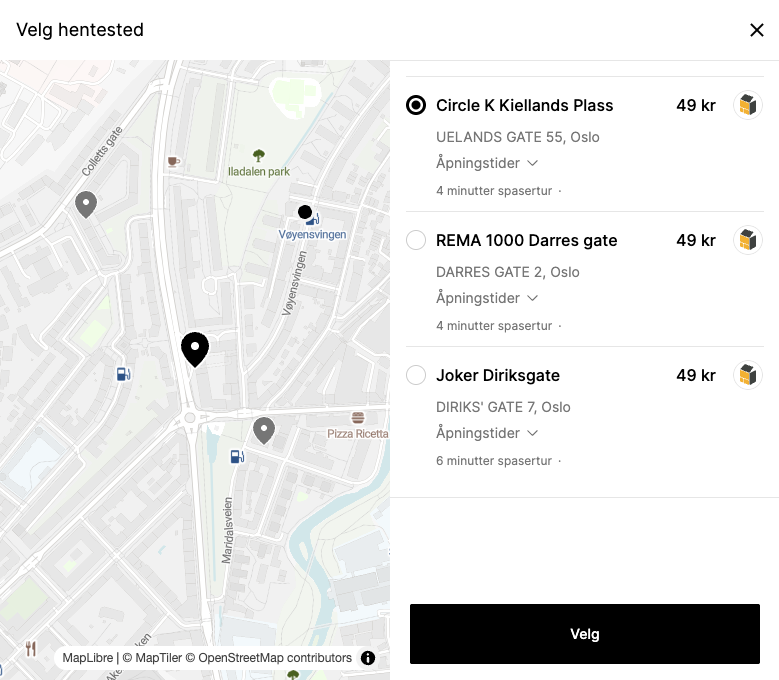
- Show service points or parcel lockers at checkout.
- Show drop-off locations on a returns page.
- Book a delivery or return to a specific location.
Example of a service point picker at checkout
Tips
-
For the most accurate results, include
streetAddress. -
The search also works with only
zipCodeandcountryCode, but the results are less accurate.
Location types
Each location in the response has a type field that tells you what kind of PUDO location it is:
type |
Location | How the recipient collects the parcel |
|---|---|---|
RETAILER |
A service point in a shop or kiosk, for example a grocery store. | Over the counter during opening hours. Check openingHours before showing the location. |
PARCEL_LOCKER |
A Helthjem parcel locker. | From the locker with a PIN code sent to the recipient. |
Use type to show the right icon or label at checkout, for example "Pick up in store" or "Pick up from locker".
Parcel lockers
Parcel lockers are automated lockers where the recipient collects the parcel with a PIN code. To find nearby parcel lockers, use transportSolutionId: 137. Parcel lockers are returned with "type": "PARCEL_LOCKER" and freightProductId: 95.
The parcel must fit the parcel locker limits: max 5000 g and 590 x 450 x 500 mm. You can book a parcel to a specific locker, let Helthjem assign the closest one, or use lockers as a fallback for home delivery. See the Parcel lockers guide for all three options with full examples.
Service points
Service points are shops and kiosks where the recipient collects the parcel over the counter. They are returned with "type": "RETAILER". Recipients are notified when the parcel is ready for pickup.
Which transport solutions to use
Helthjem mainly uses its own service points. In some remote areas, PostNord delivers as a subcontractor, so all of Norway is covered. The transport solution decides which networks you get:
| Transport solution | Networks returned | Freight products in the response |
|---|---|---|
transportSolutionId: 86 |
Helthjem only | 55 (Helthjem service point) |
transportSolutionId: 62 |
Helthjem and PostNord | 55 (Helthjem service point) or 3 (PostNord service point) |
Example
This example finds Helthjem service points near an address, then uses one of them in a booking.
Request
{
    "shopId": 16,
    "transportSolutionId": 86,
    "streetAddress": "Kongsberggata 18",
    "zipCode": "0468",
    "postalName": "Oslo",
    "countryCode": "NO"
  }
Response
{
    "freightProducts": [
        {
            "transporterId": 86,
            "transporterName": "Helthjem AS",
            "freightProductId": 55,
            "freightName": "Helthjem Hentepakke",
            "freightTitle": "Hentepakke",
            "freightDescription": "Utlevering av pakke i Helthjem butikk.",
            "servicePoints": [
                {
                    "servicePointExternalId": "40467",
                    "servicePointName": "Joker Bjølsen",
                    "visitingAddress": {
                        "postalCode": "0468",
                        "countryCode": "NO",
                        "streetNumber": "3",
                        "streetName": "BERGENSGATA",
                        "postalName": "OSLO"
                    },
                    "deliveryAddress": {
                        "postalCode": "0468",
                        "countryCode": "NO",
                        "streetNumber": "3",
                        "streetName": "BERGENSGATA",
                        "postalName": "OSLO"
                    },
                    "routingCode": null,
                    "eligibleParcelOutlet": true,
                    "openingHours": [
                        {
                            "from1": "07:00",
                            "to1": "00:00",
                            "day": "MONDAY"
                        },
                        {
                            "from1": "07:00",
                            "to1": "00:00",
                            "day": "TUESDAY"
                        },
                        {
                            "from1": "07:00",
                            "to1": "00:00",
                            "day": "WEDNESDAY"
                        },
                        {
                            "from1": "07:00",
                            "to1": "00:00",
                            "day": "THURSDAY"
                        },
                        {
                            "from1": "07:00",
                            "to1": "00:00",
                            "day": "FRIDAY"
                        },
                        {
                            "from1": "07:00",
                            "to1": "00:00",
                            "day": "SATURDAY"
                        },
                        {
                            "from1": "07:00",
                            "to1": "00:00",
                            "day": "SUNDAY"
                        }
                    ],
                    "servicePointCoordinates": [
                        {
                            "northing": 59.940547943115234,
                            "easting": 10.75981616973877
                        }
                    ]
                },
                {
                    "servicePointExternalId": "57491",
                    "servicePointName": "JOKER MARIDALSVEIEN",
                    "visitingAddress": {
                        "postalCode": "0469",
                        "countryCode": "NO",
                        "streetNumber": "169",
                        "streetName": "MARIDALSVEIEN",
                        "postalName": "OSLO"
                    },
                    "deliveryAddress": {
                        "postalCode": "0469",
                        "countryCode": "NO",
                        "streetNumber": "169",
                        "streetName": "MARIDALSVEIEN",
                        "postalName": "OSLO"
                    },
                    "routingCode": null,
                    "eligibleParcelOutlet": true,
                    "openingHours": [
                        {
                            "from1": "07:00",
                            "to1": "00:00",
                            "day": "MONDAY"
                        },
                        {
                            "from1": "07:00",
                            "to1": "00:00",
                            "day": "TUESDAY"
                        },
                        {
                            "from1": "07:00",
                            "to1": "00:00",
                            "day": "WEDNESDAY"
                        },
                        {
                            "from1": "07:00",
                            "to1": "00:00",
                            "day": "THURSDAY"
                        },
                        {
                            "from1": "07:00",
                            "to1": "00:00",
                            "day": "FRIDAY"
                        },
                        {
                            "from1": "07:00",
                            "to1": "00:00",
                            "day": "SATURDAY"
                        },
                        {
                            "from1": "09:00",
                            "to1": "00:00",
                            "day": "SUNDAY"
                        }
                    ],
                    "servicePointCoordinates": [
                        {
                            "northing": 59.93974304199219,
                            "easting": 10.759597778320312
                        }
                    ]
                },
                {
                    "servicePointExternalId": "136838",
                    "servicePointName": "REMA 1000 Bjølsen",
                    "visitingAddress": {
                        "postalCode": "0468",
                        "countryCode": "NO",
                        "streetNumber": "41",
                        "streetName": "BERGENSGATA",
                        "postalName": "OSLO"
                    },
                    "deliveryAddress": {
                        "postalCode": "0468",
                        "countryCode": "NO",
                        "streetNumber": "41",
                        "streetName": "BERGENSGATA",
                        "postalName": "OSLO"
                    },
                    "routingCode": null,
                    "eligibleParcelOutlet": true,
                    "openingHours": [
                        {
                            "from1": "06:00",
                            "to1": "00:00",
                            "day": "MONDAY"
                        },
                        {
                            "from1": "06:00",
                            "to1": "00:00",
                            "day": "TUESDAY"
                        },
                        {
                            "from1": "06:00",
                            "to1": "00:00",
                            "day": "WEDNESDAY"
                        },
                        {
                            "from1": "06:00",
                            "to1": "00:00",
                            "day": "THURSDAY"
                        },
                        {
                            "from1": "06:00",
                            "to1": "00:00",
                            "day": "FRIDAY"
                        },
                        {
                            "from1": "06:00",
                            "to1": "00:00",
                            "day": "SATURDAY"
                        }
                    ],
                    "servicePointCoordinates": [
                        {
                            "northing": 59.94405746459961,
                            "easting": 10.760120391845703
                        }
                    ]
                }
            ],
            "properties": {}
        }
    ]
}
Each location has an address, opening hours and coordinates (servicePointCoordinates), so you can show it on a map.
Use the location in a booking
Add the selected location to the booking as a servicePoint party. Use its servicePointExternalId as the id:
{
    "type": "servicePoint",
    "id": "40467",
    "countryCode": "NO"
}
Book with the same transport solution you used for the search, here transportSolutionId: 86. See Book a parcel for a full booking example with a service point.
Next steps
- Book a parcel: book the parcel to the selected location.
- Parcel lockers: book to a specific locker, an assigned locker, or use lockers as a fallback.